Extend Cursor with plugins, now available in our marketplace. pic.twitter.com/5lMEi9jath
— Cursor (@cursor_ai) February 17, 2026
Cursor just launched plugins, making it easier than ever to give Cursor structured access to external tools and infrastructure. Neon is part of the initial launch set: you can install the Neon plugin today from the Cursor Marketplace to give Cursor live access to your Neon organization along with the knowledge it needs to be genuinely useful in database tasks.
Plugins help Cursor go beyond code
Thanks to plugins, Cursor can help you not just with writing code – but also with the real work around that code. Plugins give Cursor structured access to the tools your team already relies on to actually ship software, with the right built-in context and live access.
Builders can submit their plugins to expand the collection – but to get things started, Cursor is launching with partners that span the full development lifecycle so you have access to a complete stack. For example,
- Linear and Notion for scoping work
- Figma for design
- Neon for Postgres
- Vercel for deploying
- Stripe for payments
- Sentry for debugging
- Databricks for analytics
The Neon plugin: branchable Postgres inside Cursor
The Neon plugin is one of the Infrastructure options. To install it, just click “Add to Cursor”:

The plugin bundles two things:
- The Neon MCP Server, which gives Cursor live access to your Neon organization
- The Neon skill, which defines structured workflows and best practices for working with Neon
Once installed, it will work across all your Cursor surfaces (desktop, CLI, web, and mobile).
Neon is not just Postgres: 5 reasons to run it from Cursor
The plugin is the most convenient way to give Cursor the context it needs about your existing Neon projects. But you may also be new to Neon, looking at the list of available Postgres plugins and wondering how Neon differs from the other options.
Neon has a unique serverless architecture built around environments and iteration. By installing the Neon plugin, Cursor does more than deploy a Postgres database: it makes your development workflows simpler and safer, helping you manage environments, test migrations, and validate new code.
1. Serverless by design
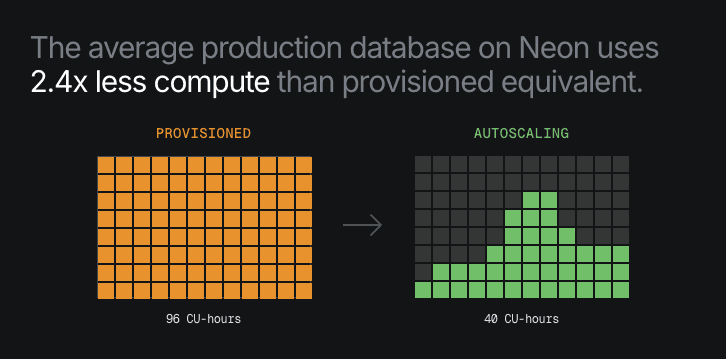
Neon databases are created instantly, without manual provisioning. Compute and storage are fully separated. Compute starts when needed, scales automatically under load, and scales to zero when idle. Storage also scales invisibly. For workflows inside Cursor, that means you don’t have to think about the infrastructure powering your database.
2. Environments with realistic data in seconds
The biggest unlock for DevX in Cursor + Neon is branching. A Neon branch feels like a full copy of your database (schema and data), identical to your main database – but it’s fully isolated, ready in a second, and doesn’t duplicate storage.
Under the hood, branches use Neon’s copy-on-write storage engine. They reference the exact data state at a specific moment in time and only store new changes. You can tell Cursor to use them to test migrations, validate schema changes, run integration tests, reproduce bugs against realistic data, and so many more things.
3. Keep it lightweight (iteration-friendly)
Because Neon branches don’t duplicate storage and scale to zero, you can create many of these short-lived environments without worrying about cost. This is especially powerful for the iterative workflows you’ll adopt when working with Cursor. Database branches become something you can create and destroy as easily as a git branch.
4. Restore instantly if a deploy goes wrong
The same architecture that powers branching enables instant restores. Neon’s storage layer keeps a full history of WAL records and page versions; and because compute is separated from storage, Neon can spin up a branch at any previous point in time without copying data or waiting for long restore processes. That means you can ask Cursor things like
- “roll back this branch 5 minutes”
- “restore this database to yesterday’s state”
- “test against the schema as it existed last week”
And don’t wait for hours for any of these things to finish.
5. True and tested API
Neon is API-first: every major operation can be managed programmatically. This isn’t new for Neon – since the early days of the platform, Neon has powered other tools and platforms that provision and manage Postgres entirely via API, which is the best interface for agents.
This API maturity is highly relevant to make the Cursor experience truly useful and robust. When Cursor connects to Neon through MCP, it’s interacting with a database environment that already speaks the language of agents.
Try Neon from Cursor
Install the Neon plugin from the Cursor Marketplace and start experimenting with real database workflows from Cursor.
If you’re new to Neon, you can create a free account in a minute – and if you have any questions, you’ll find us in the Neon Discord.