








Boost your productivity with AI context rules for Neon. These rules help AI assistants understand Neon's features, leading to more accurate code suggestions and fewer common mistakes.
If you're using Claude Code, install the comprehensive Neon plugin that bundles Skills, MCP integration, and all context rules in one package. For other AI tools like Cursor, use the individual .mdc context rule files.
AI Rules are in Beta
AI Rules are currently in beta. We're actively improving them and would love to hear your feedback. Join us on Discord to share your experience and suggestions.
For Claude Code
If you're using Claude Code, install the Neon plugin to get Skills, MCP integration, and all the context rules in one package:
Individual AI rules
For other AI tools like Cursor, you can use these individual .mdc context rule files. Copy them to your AI tool's custom rules directory — the format is tool-agnostic and works with any AI assistant that supports context rules.
Neon Auth
AI rules for implementing authentication with Neon
Neon Serverless Driver
AI rules for serverless database connections
Neon Drizzle
AI rules for using Drizzle ORM with Neon
Neon API TypeScript SDK
AI rules for using the Neon API TypeScript SDK
Neon Python SDK
AI rules for using the Neon Python SDK
Neon API
AI rules for using the Neon API
Neon Toolkit
AI rules for using the Neon Toolkit
How it works
AI rules are .mdc files that specify which types of files they apply to (such as *.tsx or schema.sql). When you're working with a matching file, your AI tool automatically applies the relevant rules to provide better suggestions.
Example: AI rules in action
Here's a practical example using Cursor. A developer has implemented authentication in their server-rendered page and wants to confirm best practices:
Developer query: "Using the neon-auth.mdc rule, how do I secure a server-rendered page?"
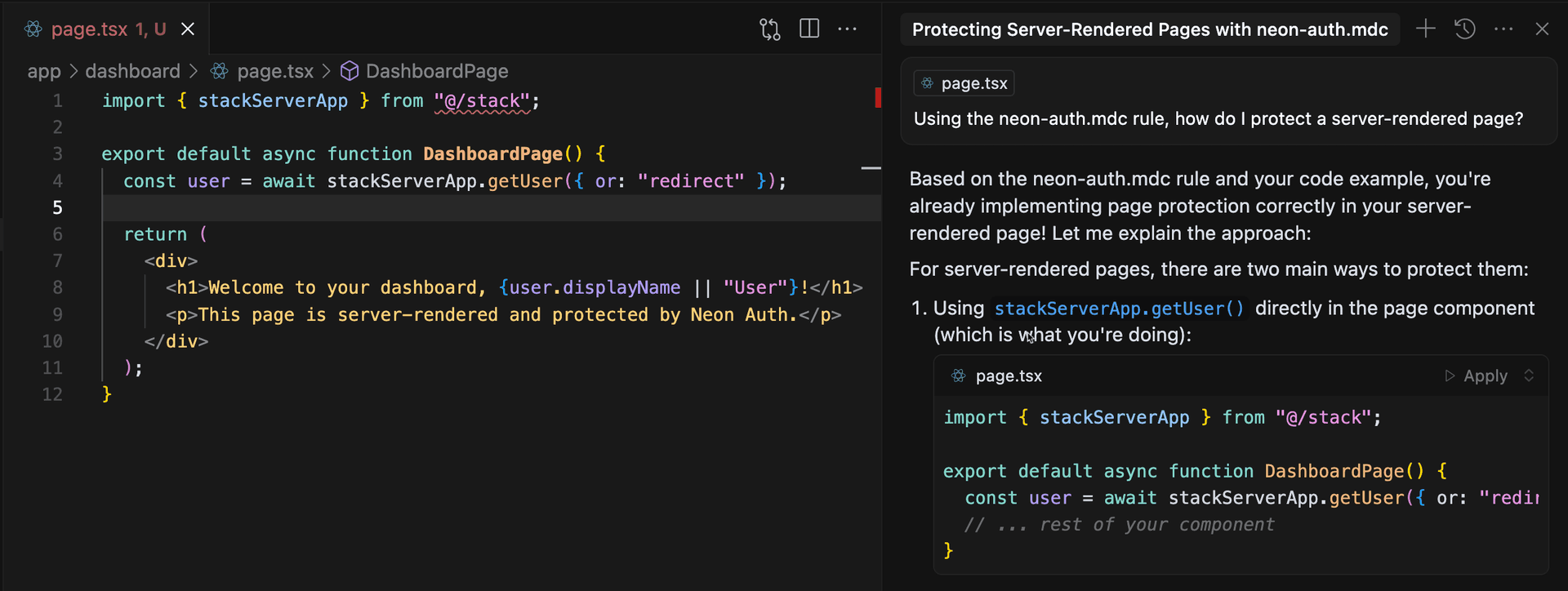
The AI confirms that using stackServerApp.getUser({ or: "redirect" }) is the correct approach for server-side authentication, providing additional context and explanation.
Add rules to your project
All .mdc files are available in the Neon AI Rules toolkit repository. Copy the files you need to your project's .cursor/rules folder (or your AI tool's equivalent):
.cursor/
  rules/
    neon-auth.mdc
    neon-serverless.mdc
    neon-drizzle.mdc
    neon-toolkit.mdc
    neon-typescript-sdk.mdc
    neon-python-sdk.mdc
    neon-api-guidelines.mdc
    neon-api-projects.mdc
    neon-api-branches.mdc
    neon-api-endpoints.mdc
    neon-api-organizations.mdc
    neon-api-keys.mdc
    neon-api-operations.mdc
Most AI tools will automatically apply these rules when you're working with Neon-related code. You can also reference them explicitly in prompts for more targeted assistance.