








In this tutorial, we'll walk through our note-taking app to show how Neon's Data API works with the @neondatabase/neon-js client library to write queries from your frontend code, with proper authentication and Row-Level Security (RLS) policies ensuring your data stays secure. The Data API is compatible with PostgREST, so you can use any PostgREST client library.
About the sample application
This note-taking app is built with React and Vite. It uses Neon Auth for authentication, the Data API for direct database access, and Drizzle ORM for handling the schema.
See it in action: Check out the live demo at neon-data-api-neon-auth.vercel.app
Tip: If you encounter issues with social login providers, try email/password instead.
Set up the demo app
Prerequisites
Before you begin, ensure you have:
- Bun (v1.0 or newer) installed
- A Neon account (free tier works)
Create a Neon project with Auth and Data API
- Go to pg.new to create a new Neon project
- In the Neon Console, navigate to your project and go to the Data API page in the left sidebar
- Select Neon Auth as your authentication option (the default), then click Enable
This enables both the Data API and Neon Auth in one step. For detailed instructions, see Getting started with Data API.
Clone and install
git clone https://github.com/neondatabase-labs/neon-data-api-neon-auth.git
cd neon-data-api-neon-auth
bun install
Configure environment variables
Create a .env file in the project root:
# Neon Data API URL
# Find this in Neon Console → Data API page → "Data API URL"
VITE_NEON_DATA_API_URL=https://your-project-id.data-api.neon.tech

# Neon Auth Base URL
# Find this in Neon Console → Auth page → "Auth Base URL"
VITE_NEON_AUTH_URL=https://your-project-id.auth.neon.tech

# Database Connection String (for migrations)
# Find this in Neon Console → Dashboard → Connection string (select "Pooled connection")
DATABASE_URL=postgresql://user:password@your-project-id.pooler.region.neon.tech/neondb?sslmode=require
Set up the database
Run the migration to create the tables and RLS policies:
bun run db:migrateThis will:
- Grant appropriate permissions to the
authenticatedandanonymousdatabase roles - Create the
notesandparagraphstables with RLS policies
Start the development server
bun devOpen http://localhost:5173 in your browser.
How the demo app works
Now that you have the app running, let's explore how it uses the Data API. The following sections explain the key patterns and techniques used in the demo app.
Initialize the client
The demo app uses @neondatabase/neon-js to connect to both the Data API and Neon Auth. Here's how the client is configured in src/lib/auth.ts:
import { createClient } from '@neondatabase/neon-js';
import { BetterAuthReactAdapter } from '@neondatabase/neon-js/auth/react/adapters';
import type { Database } from '../../types/database';

export const client = createClient<Database>({
  auth: {
    adapter: BetterAuthReactAdapter(),
    url: import.meta.env.VITE_NEON_AUTH_URL,
  },
  dataApi: {
    url: import.meta.env.VITE_NEON_DATA_API_URL,
  },
});
This single client provides:
- Authentication methods via
client.auth(sign up, sign in, sign out, get session) - Database query methods via
client.from()(select, insert, update, delete)
The client automatically handles JWT token management — when a user is signed in, the token is included in all Data API requests, enabling RLS policies to work correctly.
Database schema
The app uses two main tables: notes and paragraphs. Here's how they're defined in src/db/schema.ts:
export const notes = pgTable(
  'notes',
  {
    id: uuid('id').defaultRandom().primaryKey(),
    ownerId: text('owner_id')
      .notNull()
      .default(sql`auth.user_id()`),
    title: text('title').notNull().default('untitled note'),
    createdAt: timestamp('created_at', { withTimezone: true }).defaultNow(),
    updatedAt: timestamp('updated_at', { withTimezone: true }).defaultNow(),
    shared: boolean('shared').default(false),
  }
  // ... RLS policies defined here
).enableRLS();

export const paragraphs = pgTable(
  'paragraphs',
  {
    id: uuid('id').defaultRandom().primaryKey(),
    noteId: uuid('note_id').references(() => notes.id),
    content: text('content').notNull(),
    createdAt: timestamp('created_at', { withTimezone: true }).defaultNow(),
  }
  // ... RLS policies defined here
).enableRLS();
Each note belongs to a user (via ownerId), and paragraphs are linked to notes through noteId.
Securing tables with RLS
When making direct database queries from the frontend, Row-Level Security (RLS) policies are essential. They ensure that users can access only their own data.
RLS is crucial for any real-world app. RLS policies act as a safety net at the database level, so even if your frontend code has bugs, your data stays protected.
The demo app uses Drizzle ORM to define RLS policies, which we highly recommend as a simpler, more maintainable way of writing RLS policies. Here's how the notes table defines its policies:
crudPolicy({
  role: authenticatedRole,
  read: authUid(table.ownerId),
  modify: authUid(table.ownerId),
}),
pgPolicy("shared_policy", {
  for: "select",
  to: authenticatedRole,
  using: sql`${table.shared} = true`,
}),
These Drizzle policies generate the equivalent SQL policies for all CRUD operations (SELECT, INSERT, UPDATE, DELETE). For example:
-- SELECT
CREATE POLICY "crud-authenticated-policy-select" ON "notes"
  AS PERMISSIVE FOR SELECT TO "authenticated"
  USING ((select auth.user_id() = "notes"."owner_id"));
-- DELETE (similar for INSERT and UPDATE)
CREATE POLICY "crud-authenticated-policy-delete" ON "notes"
  AS PERMISSIVE FOR DELETE TO "authenticated"
  USING ((select auth.user_id() = "notes"."owner_id"));
CREATE POLICY "shared_policy" ON "notes"
  AS PERMISSIVE FOR SELECT TO "authenticated"
  USING ("notes"."shared" = true);
The policies ensure:
- Users can only access their own notes (
SELECT,INSERT,UPDATE,DELETE) - Shared notes are visible to authenticated users
- Data access is enforced at the database level
The paragraphs table uses similar Drizzle policies that check ownership through the parent note:
crudPolicy({
  role: authenticatedRole,
  read: sql`(select notes.owner_id = auth.user_id() from notes where notes.id = ${table.noteId})`,
  modify: sql`(select notes.owner_id = auth.user_id() from notes where notes.id = ${table.noteId})`,
}),
pgPolicy("shared_policy", {
  for: "select",
  to: authenticatedRole,
  using: sql`(select notes.shared from notes where notes.id = ${table.noteId})`,
}),
About auth.user_id()
Neon's RLS policies use the auth.user_id() function, which extracts the user's ID from the JWT (JSON Web Token) provided by your authentication provider. In this demo, Neon Auth issues the JWTs, and Neon's Data API passes them to Postgres, so RLS can enforce per-user access.
For more details on RLS with Data API, see our Row-Level Security with Neon guide.
Data API query patterns
Now let's look at how the demo app performs CRUD operations using the Data API.
INSERT — Creating a new note
When a user creates a new note, the app generates a unique codename-style title and inserts it into the database. Here's how it works in src/routes/note.tsx:
const { data, error } = await client
  .from('notes')
  .insert({ title: generateNameNote() })
  .select('id, title, shared, owner_id, paragraphs (id, content, created_at, note_id)')
  .single();
The .select() chained after .insert() lets you insert a record and immediately fetch it back — along with related data from other tables — in a single query. This is a useful pattern provided by the PostgREST-compatible API.
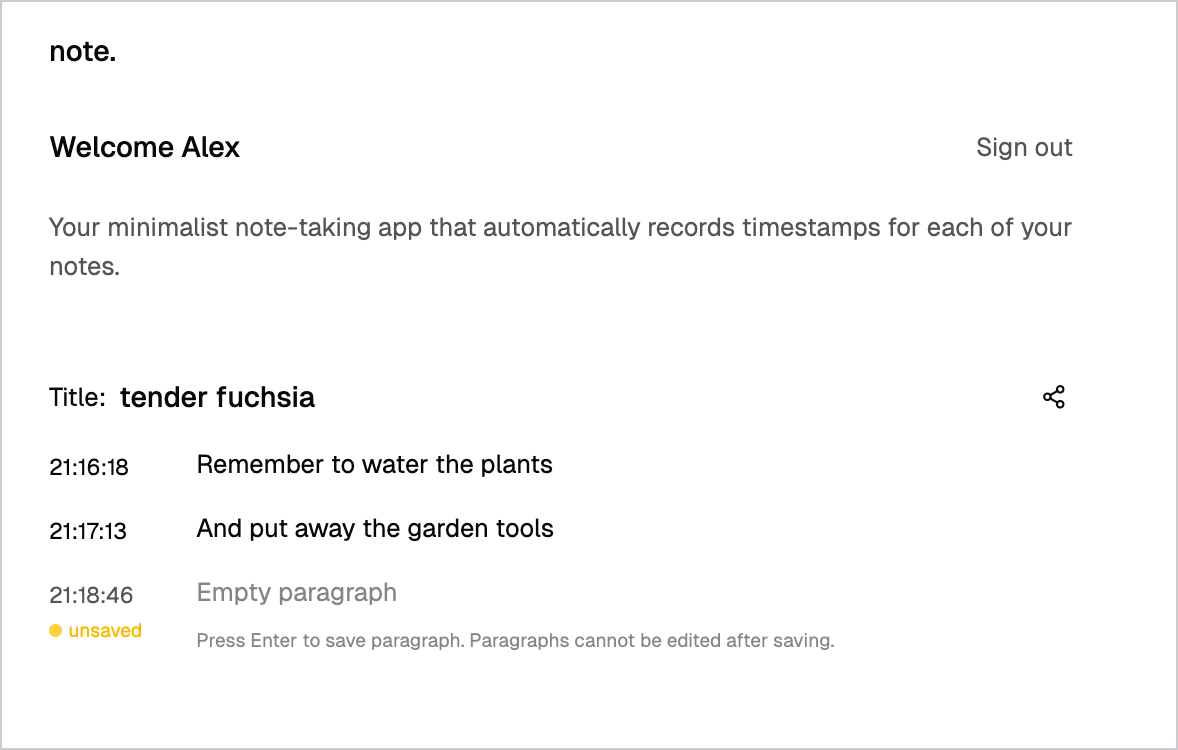
That's why you'll see codename-style labels like "tender fuchsia" in your notes list:
SELECT — Fetching all notes
To display all notes for the current user, ordered by creation date, the app queries the database in src/routes/index.tsx:
const { data, error } = await client
  .from('notes')
  .select('id, title, created_at, owner_id, shared')
  .eq('owner_id', session.data.user.id)
  .order('created_at', { ascending: false });
The .eq('owner_id', session.data.user.id) method filters results, similar to a SQL WHERE clause, ensuring only notes belonging to the current user are returned.
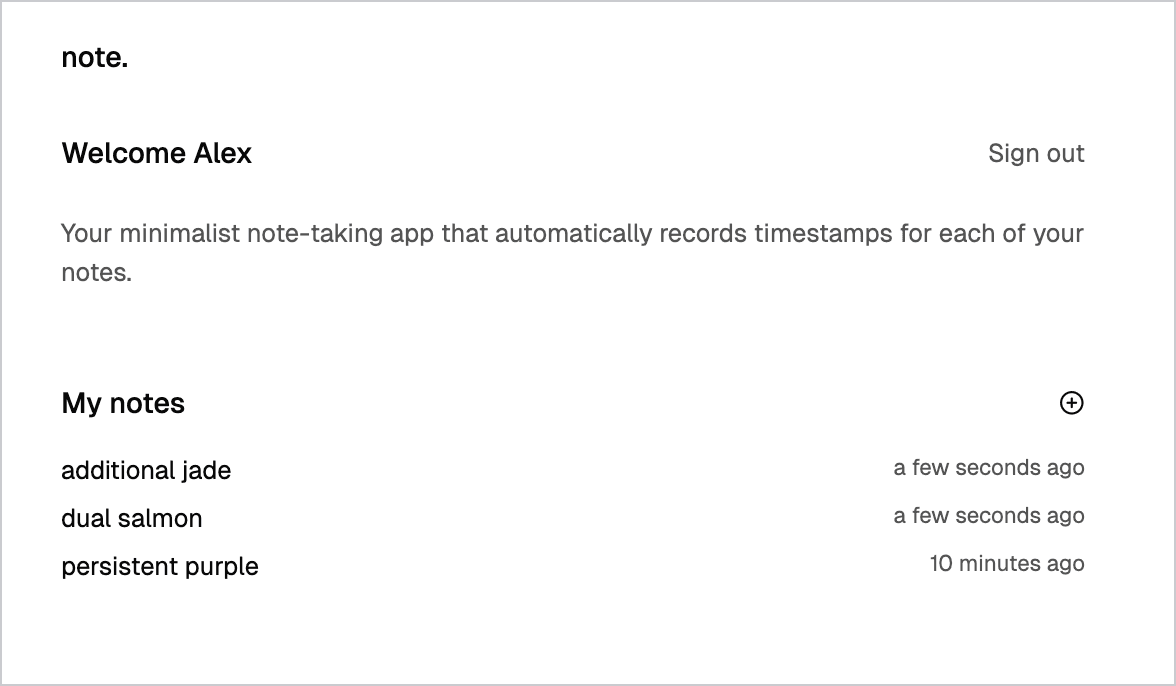
Here's what your notes list will look like:
Hint: To get back to your main notes list, click the "note." heading at the top of the app.
UPDATE — Renaming a note
You can rename any note by editing its title directly in the app. When you do, the app updates the note in the database. Here's how it works in src/components/app/note-title.tsx:
const { error } = await client.from('notes').update({ title: newTitle }).eq('id', id);You can chain methods like .from(), .update(), and .eq() to build queries. For more complex queries, refer to the Neon TypeScript SDK documentation.
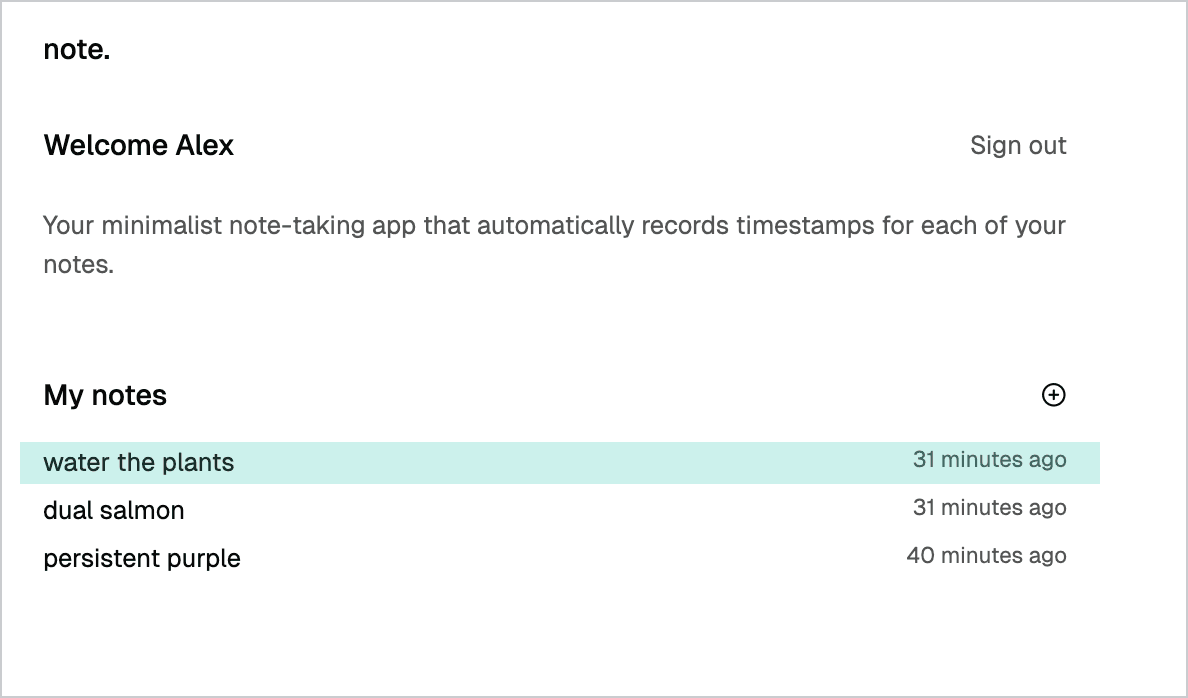
Here's how a note looks after you update its title:
INSERT — Adding paragraphs
When you press Enter to submit a paragraph, the app inserts it into the paragraphs table. Here's the pattern from src/routes/note.tsx:
const { data, error } = await client
  .from('paragraphs')
  .insert({
    note_id: id,
    content: previousParagraph.content.trim(),
  })
  .select('*')
  .single();
Try it yourself: Adding delete functionality
If you've explored the app, you may have noticed there's no way to delete a note. This is intentional — it's a hands-on exercise to help you understand the Data API patterns.
Step 1: Add a delete button to the note card component
Update src/components/app/note-card.tsx to include a delete button:
import { Link } from "@tanstack/react-router";
import moment from "moment";
import { Trash2Icon } from "lucide-react";

export default function NoteCard({
  id,
  title,
  createdAt,
  onDelete,
}: {
  id: string;
  title: string;
  createdAt: string;
  onDelete?: () => void;
}) {
  return (
    <div className="flex justify-between items-center">
      <Link to="/note" search={{ id }} className="flex-1 flex justify-between">
        <h5>{title}</h5>
        <p className="text-sm text-foreground/70">
          {moment(createdAt).fromNow()}
        </p>
      </Link>
      {onDelete && (
        <button
          onClick={onDelete}
          className="ml-2 p-1 text-muted-foreground hover:text-red-500"
        >
          <Trash2Icon size={16} />
        </button>
      )}
    </div>
  );
}
Step 2: Add the delete handler to the notes list
Update src/components/app/notes-list.tsx to include the delete handler:
import NoteCard from "@/components/app/note-card";
import type { Note } from "@/lib/api";
import { useRouter } from "@tanstack/react-router";
import { PlusCircleIcon } from "lucide-react";
import { client } from "@/lib/auth";

export default function NotesList({ notes }: { notes: Note[] }) {
  const router = useRouter();

  const addNote = async () => {
    router.navigate({
      to: "/note",
      search: { id: "new-note" },
      replace: true,
    });
  };

  const handleDelete = async (id: string) => {
    const { error } = await client.from("notes").delete().eq("id", id);
    if (!error) {
      window.location.reload();
    }
  };

  return (
    <div className="flex flex-col gap-4">
      <header className="flex items-center justify-between">
        <h3>My notes</h3>
        <button
          type="button"
          className="cursor-pointer border-none bg-none hover:bg-none flex items-center gap-1.5"
          onClick={addNote}
        >
          <PlusCircleIcon className="w-4 h-4" />
        </button>
      </header>
      <main className="flex flex-col gap-1.5 ">
        {notes?.map((note) => (
          <NoteCard
            key={note.id}
            id={note.id}
            title={note.title}
            createdAt={note.created_at}
            onDelete={() => handleDelete(note.id)}
          />
        ))}
        {notes.length === 0 && (
          <div className="text-sm text-foreground/50">No notes yet</div>
        )}
      </main>
    </div>
  );
}
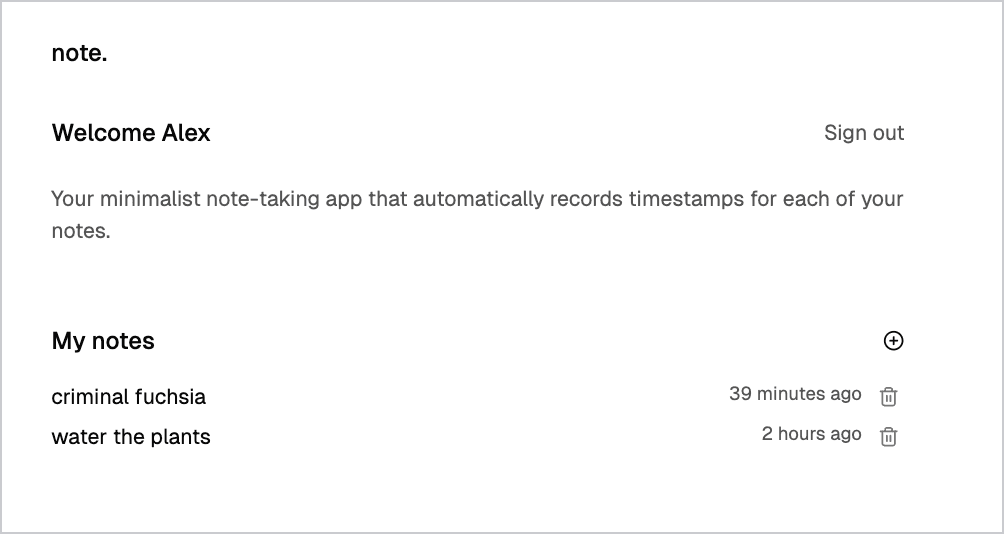
Your app now includes a delete icon next to each note:
If you can't delete a note, it likely still has paragraphs attached. Postgres prevents deleting notes that have related paragraphs because of the foreign key relationship.
Step 3: Enable ON DELETE CASCADE
To allow deleting a note and all its paragraphs in one go, update your schema to use ON DELETE CASCADE on the paragraphs.note_id foreign key.
You can do this in the Neon SQL editor:
ALTER TABLE paragraphs
  DROP CONSTRAINT paragraphs_note_id_notes_id_fk,
  ADD CONSTRAINT paragraphs_note_id_notes_id_fk
    FOREIGN KEY (note_id) REFERENCES notes(id) ON DELETE CASCADE;
If you get an error about the constraint name, your database may use a different name for the foreign key. To find it, run:
SELECT conname FROM pg_constraint WHERE conrelid = 'paragraphs'::regclass;Then use the name you find in the DROP CONSTRAINT and ADD CONSTRAINT commands above.
Now test deleting a note that has paragraphs — both the note and its paragraphs should be removed from the database.