








Prisma is an open-source, next-generation ORM for Node.js and TypeScript. This guide shows you how to connect a Prisma application to Neon using the recommended setup with the Neon serverless driver adapter.
Prerequisites
- A Neon account and project
- Node.js 18+ installed
- A Node.js or TypeScript project (or create a new one)
Setup
Step 1: Install dependencies
npm install @prisma/client @prisma/adapter-neon dotenv
npm install prisma --save-dev
Step 2: Get your connection strings
From your Neon Console, click Connect and copy both connection strings:
- Pooled connection (has
-poolerin the hostname) — for your application - Direct connection — for Prisma CLI commands (migrations, introspection)
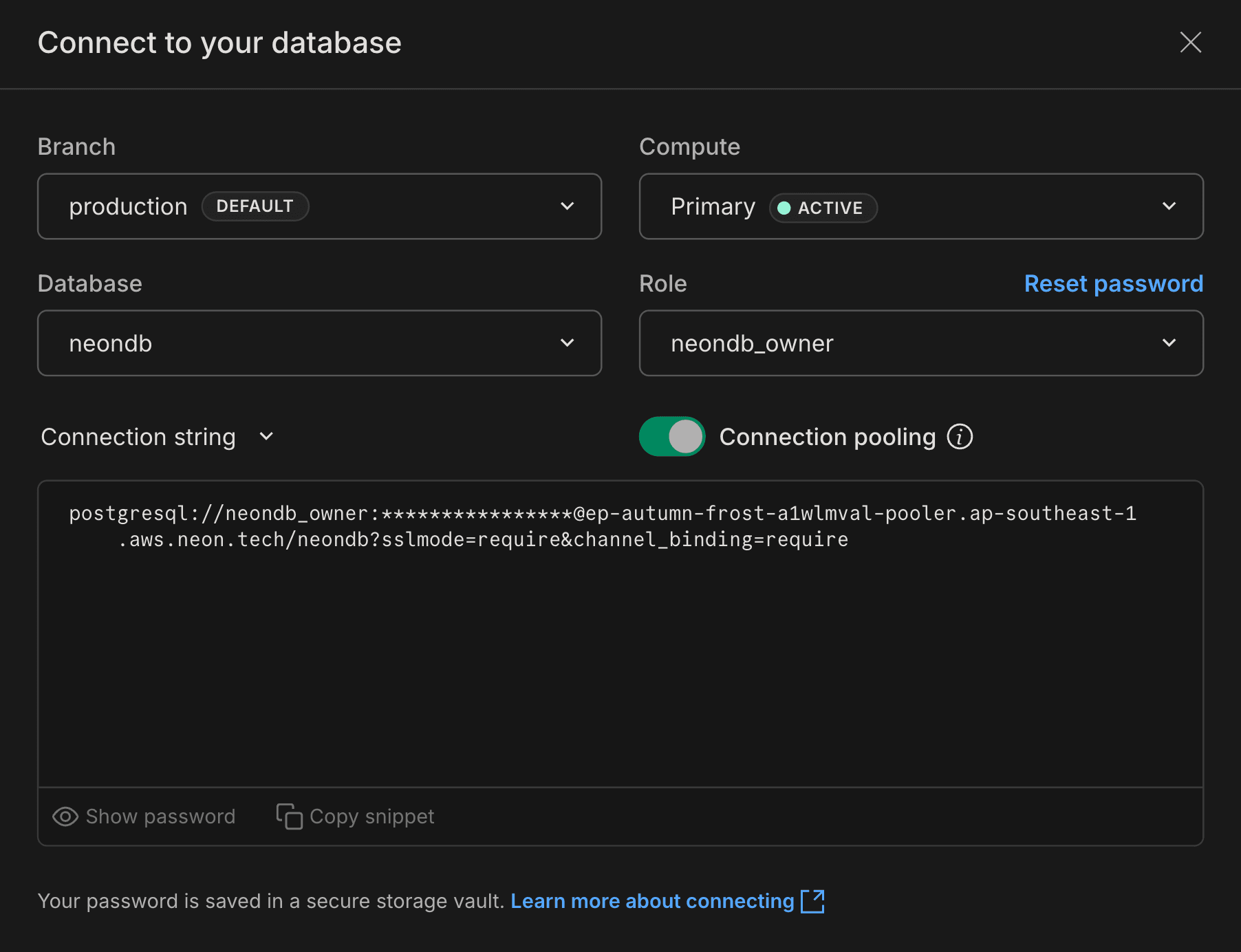
Add them to your .env file:
# Pooled connection for your application
DATABASE_URL="postgresql://[user]:[password]@[endpoint]-pooler.[region].aws.neon.tech/[dbname]?sslmode=require"

# Direct connection for Prisma CLI
DIRECT_URL="postgresql://[user]:[password]@[endpoint].[region].aws.neon.tech/[dbname]?sslmode=require"
tip
The pooled connection has -pooler in the hostname. The direct connection does not. Both are available in your Neon Console.
Step 3: Configure your Prisma schema
If you don't have a Prisma schema yet, run npx prisma init to create one. Then update prisma/schema.prisma:
generator client {
  provider = "prisma-client-js"
  output   = "../src/generated/prisma"
}

datasource db {
  provider = "postgresql"
}

model User {
  id        Int      @id @default(autoincrement())
  email     String   @unique
  name      String?
  createdAt DateTime @default(now())
}
note
In Prisma 7+, do not include a url property in the datasource block. The connection is configured via prisma.config.ts and the adapter.
Step 4: Create prisma.config.ts
Create a prisma.config.ts file in your project root. This tells Prisma CLI where to connect for migrations and other commands:
import 'dotenv/config'
import { defineConfig, env } from 'prisma/config'

export default defineConfig({
  schema: 'prisma/schema.prisma',
  datasource: {
    url: env('DIRECT_URL'),
  },
})
Step 5: Create your Prisma Client
Create a file to instantiate Prisma Client with the Neon adapter (e.g., src/db.ts):
import 'dotenv/config'
import { PrismaClient } from './generated/prisma'
import { PrismaNeon } from '@prisma/adapter-neon'

const adapter = new PrismaNeon({
  connectionString: process.env.DATABASE_URL!,
})

export const prisma = new PrismaClient({ adapter })
Step 6: Generate client and push schema
npx prisma generate
npx prisma db push
You're connected. You can now use Prisma Client in your application:
import { prisma } from './db'

const users = await prisma.user.findMany()
Why two connection strings?
Neon uses connection pooling to efficiently manage database connections in serverless environments:
- Pooled connection (
DATABASE_URL): Your application connects through Neon's connection pooler, which is optimal for serverless functions that create many short-lived connections. - Direct connection (
DIRECT_URL): Prisma CLI commands likeprisma migrateandprisma db pushneed a direct connection for schema operations.
Advanced configuration
Using a non-public PostgreSQL schema
If you're using a PostgreSQL schema other than public, pass a schema option when creating the adapter:
const adapter = new PrismaNeon(
  { connectionString: process.env.DATABASE_URL! },
  { schema: 'myPostgresSchema' }
)
Setting the search path for raw SQL queries
For raw SQL queries that reference tables without schema qualification, use PostgreSQL's options parameter in your connection string:
postgresql://[user]:[password]@[neon_hostname]/[dbname]?options=-c%20search_path%3DmyschemanameTroubleshooting
Connection timeouts
If you see an error like:
Error: P1001: Can't reach database server at `ep-example-123456.us-east-2.aws.neon.tech`:`5432`This usually means the Prisma query engine timed out before Neon activated the compute. Neon computes scale to zero after inactivity and take a few seconds to wake up.
Add a connect_timeout parameter to your connection string:
DATABASE_URL="postgresql://...?sslmode=require&connect_timeout=15"A value of 0 means no timeout.
Connection pool timeouts
Prisma maintains its own connection pool. If you're seeing pool-related timeouts, you can configure:
connection_limit: Number of connections in the pool (default:num_cpus * 2 + 1)pool_timeout: Seconds to wait for a connection from the pool (default: 10)
DATABASE_URL="postgresql://...?sslmode=require&connection_limit=20&pool_timeout=15"See Prisma's connection management guide for details.
Using Prisma 6 or earlier
In Prisma 6 and earlier, you configure the connection directly in schema.prisma instead of prisma.config.ts:
datasource db {
  provider  = "postgresql"
  url       = env("DATABASE_URL")
  directUrl = env("DIRECT_URL")
}
The directUrl property is available in Prisma 4.10.0 and higher.
Next steps
- Schema migrations with Prisma — Full tutorial for building an app with migrations
- Neon serverless driver — Learn more about the driver powering the adapter
Resources
Need help?
Join our Discord Server to ask questions or see what others are doing with Neon. For paid plan support options, see Support.